There’s no single best video conferencing camera. That’s the first thing to get out of the way, because most buyer’s guide content pretends otherwise. The Logitech Rally Bar that gets glowing reviews for a 10-person boardroom is genuinely the wrong camera for a 4-person huddle room. The PTZ camera that transforms a large conference room ends up being overkill, misconfigured, and ignored in a small space.
The right camera is always the one matched to the specific room it’s going in: its dimensions, its typical occupancy, its distance from camera to participants, and what conferencing platform it’s connecting to. This guide breaks it down by room size and format so you can figure out what actually makes sense for each space in your office.
This guide covers one part of the buying decision. For the full picture, see our complete AV equipment buying and procurement guide.
What Makes a Camera Right for a Room
Before getting into specific products, let’s cover the variables that actually determine camera suitability. These are the questions you should be answering before you look at a single spec sheet.
How many people typically occupy the room? This drives field of view requirements. A camera serving four people around a small table needs a different FOV than one serving twelve people around a large table.
How far are participants from the camera? Distance determines whether you need optical zoom and what minimum resolution matters. At 6 feet, a wide-angle integrated bar camera works fine. At 16 feet, you need a camera that can zoom in optically to show faces at a useful size.
What platform is the organization using? Zoom, Teams, Google Meet, and Webex each have certification programs. Using certified hardware for your platform avoids compatibility issues that surface later and ensures AI features work as designed.
Is the room hybrid? A room where remote participants are full meeting equals rather than observers needs a camera that makes everyone in the room visible and natural-looking to remote participants. The stakes are higher.
Who operates the room? A camera that requires someone to manually control its pan and tilt every meeting creates friction. If the room is self-service, the camera needs reliable auto-framing so nobody has to manage it.
With those questions answered for each room, the right camera category becomes clear before you’ve looked at a single product.
Huddle Rooms: 2–6 People
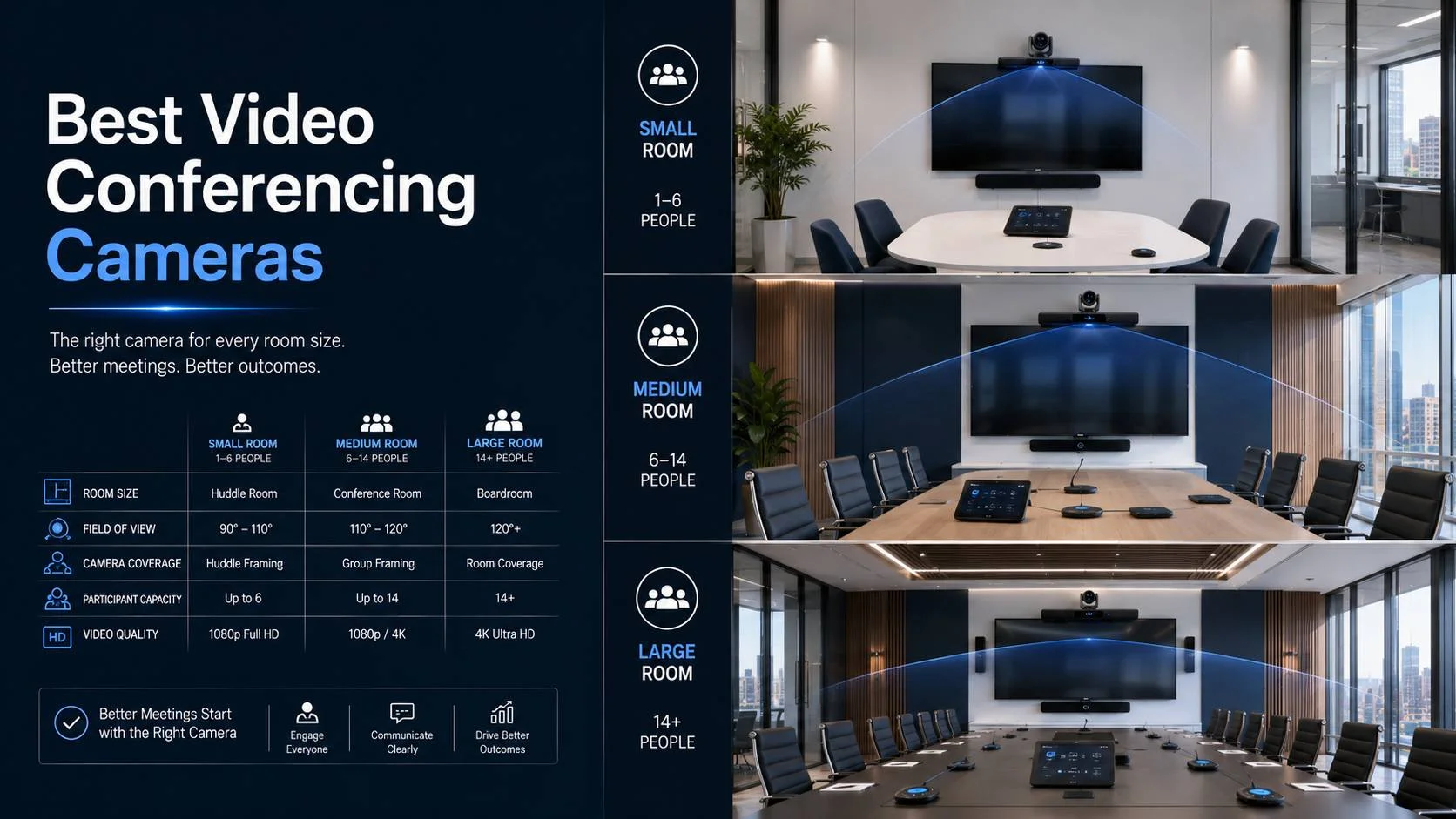
Huddle rooms are where camera choice gets most abused in both directions. They’re small, fast-setup spaces that seat two to six people, typically around a small table, often with the display at one end and everyone seated within 6 to 8 feet of the camera.
The most common mistake: buying a consumer USB webcam for a huddle space because it’s cheap. A consumer webcam on top of a 55-inch display doesn’t cover a 4-person table, doesn’t have a wide enough field of view, has no meaningful echo cancellation in its built-in mic, and looks amateur in a business meeting environment.
The second most common mistake in the other direction: specifying a full PTZ camera setup for a room that’s 10 by 12 feet. A PTZ camera in that small a space is unnecessary complexity for a problem that doesn’t exist at that scale.
The right solution for most huddle rooms is an integrated video bar: a single unit combining a wide-angle camera, a multi-capsule microphone array, and a speaker, designed specifically for the small-room use case.
Top Picks for Huddle Rooms
Logitech Rally Bar Mini. This is consistently the benchmark for small room integrated bars. 4K ultra-wide camera with a 120-degree diagonal field of view. AI-based auto-framing that works well at small room distances. Good microphone coverage for up to 6 people. Certified for Zoom, Teams, and Google Meet. Mounts below or above the display. Clean, professional design that looks intentional in a business environment.
Poly Studio. Strong performer particularly on the audio side. Beam-tracking microphone that follows the active speaker is genuinely impressive. The camera is slightly less capable than the Rally Bar Mini but the audio difference is noticeable. Good option for rooms where audio quality is the priority.
Jabra PanaCast 50. If the huddle room has an unusual layout, people sitting along two sides of a small table, or the room is a bit wider than typical, the PanaCast 50’s 180-degree field of view covers situations that standard cameras don’t. The fisheye effect at the edges is real but acceptable for many rooms.
Logitech MeetUp. For very small spaces, a two to four-person space specifically, the MeetUp is the more affordable option within the Logitech ecosystem. The 120-degree FOV works at very close range. At 8 or more feet from camera to participants, it starts to show its limits.
For Teams-heavy organizations: The certified Teams variant of the Rally Bar Mini (with the Microsoft Teams Rooms compute unit) produces the best one-tap join experience. Worth specifying when Teams is the primary platform.
Huddle room video conferencing systems need to match the specific room dimensions and construction (glass-heavy vs. solid-wall rooms have different audio requirements) as part of the selection, not just the product category.
Small Conference Rooms: 6–10 People
At this room size, the camera requirements start to diverge from what an integrated bar handles well. Tables are typically 10 to 14 feet long. The people at the far ends are 7 to 10 feet from the camera. The auto-framing in a bar-style camera starts to produce a wide shot where everyone is small rather than a useful frame that shows participants clearly.
There are two approaches that work here:
Option 1: A Better Integrated Bar
Some higher-tier bars have more capable cameras with better zoom range and improved auto-framing for slightly larger rooms.
Logitech Rally Bar. The full Rally Bar (not Mini) handles small-to-medium conference rooms well. Better optical zoom range than the Mini allows it to produce usable framing at greater distances. The Rally Bar is the right step up from the Mini when the table is 12 to 14 feet long.
Poly Studio X52 or X70. Poly’s higher-tier room bars use more sophisticated cameras and AI processing. The X70 is particularly capable for larger room situations. Native Teams and Zoom support.
Option 2: Separate PTZ Camera + Audio System
At the upper end of this room size category, a dedicated PTZ camera paired with a separate table or ceiling microphone system often produces better results than an integrated bar.
A PTZ camera mounts above or below the display, pan-tilt-zooms across the room under AI or manual control, and provides optical zoom that an integrated bar typically doesn’t match. Combined with a proper beamforming table mic or ceiling array, the full system outperforms an integrated bar in this room size when properly configured.
Huddly L1. A newer but impressive entrant. The Huddly L1 is a dedicated conference room camera with strong AI-based auto-framing and good optical zoom for its size. Works with most platforms via USB and has specific integrations with Logitech and Poly room systems for integration into a broader ecosystem.
Aver CAM570. A solid mid-range PTZ with 4K capture, 12x optical zoom, and auto-tracking. Good value in this category and certified for major platforms.
Platform consideration at this room size: Teams room setup for small to medium conference spaces often benefits from Teams-certified camera hardware specifically because Teams’ AI video features, background blur, voice isolation, and intelligent camera work most effectively with certified devices.
Medium Conference Rooms: 10–14 People
This room size is where camera selection genuinely gets harder. Tables are 14 to 18 feet long. Participants at the far end are 10 to 14 feet from the camera. A standard integrated bar camera produces a wide shot that makes everyone look like they’re in the back row of a cinema. Remote participants can’t read expressions. The meeting feels disconnected.
What works here is almost always a dedicated PTZ camera with meaningful optical zoom, auto-tracking or speaker tracking capability, and the network connectivity to be managed by the room’s control system.
PTZ Cameras for Medium Rooms
Poly EagleEye IV. Poly’s dedicated PTZ camera line produces excellent image quality for conference room applications. 12x optical zoom, ePTZ tracking, and strong auto-framing. Integrates well with Poly audio equipment and with Zoom and Teams room systems. The image quality is noticeably better than lower-cost PTZ alternatives.
Logitech Rally Camera. Designed specifically for conference rooms as a standalone camera (without the integrated audio of the Rally Bar). 15x HD zoom, 4K sensor, wide 90-degree FOV before zoom. Works as a standalone USB camera or as part of a Rally system. Good choice when you want Logitech’s ecosystem but need a dedicated camera separate from the audio system.
Huddly S1. A compact PTZ camera with strong AI-based tracking and a more affordable price point than the premium Poly or Cisco options. Works well in medium rooms with ceiling installation or display-mount configurations.
Cisco Webex PTZ Camera. For Webex-certified room environments, Cisco’s native camera option integrates most deeply with the Webex platform’s features. Particularly relevant for organizations with enterprise Webex deployments where features like noise removal and meeting intelligence are important.
Aver TR313V2. Auto-tracking PTZ with 4K capture and 12x optical zoom. Particularly good value in this category. The auto-tracking uses both audio localization and visual tracking, which produces more stable speaker following than audio-only tracking systems.
Audio and Camera Integration at This Room Size
At medium room scale, the camera and audio decisions become more interdependent. A ceiling microphone array that covers the full table needs to coordinate with the camera’s auto-framing so that when the microphone identifies the active speaker’s zone, the camera can frame appropriately.
Several platforms and control systems support this coordination natively. The Shure MXA910 ceiling array, for example, has AES67 audio over IP output and can send speaker zone information to compatible cameras and control systems. Hybrid meeting camera and microphone coordination for this room size is one of the more technically complex aspects of conference room design and benefits from being planned together rather than selecting camera and audio independently.
Large Conference Rooms and Boardrooms: 14–20 People
At this scale, the room is almost always a dedicated boardroom, a client-facing meeting space, or a large-format collaboration room. The investment level in furniture and architecture reflects the importance of the space. The camera specification should match.
Long tables mean significant distances from camera to participants. 18 to 24 feet from camera to the far end of the table is not unusual. This is beyond the effective range of most integrated bars and standard PTZ cameras. You need a camera with sufficient optical zoom to produce a useful close-up of a speaker at that distance.
The options that perform in this environment are a narrower list than the medium room category.
High-Specification PTZ Cameras for Large Rooms
Poly EagleEye Director II. Poly’s top-tier automated camera system for large conference rooms. Uses dual 1080p cameras with automated composition that frames the room, individual speakers, and groups. The Director II is specifically designed for executive rooms where the production quality of the video output matters. It doesn’t look like a typical conference room camera. The image quality reflects that.
Cisco Webex Quad Camera. Four separate cameras in one unit, combined with sophisticated AI to produce a multi-angle room view that no single-lens PTZ can match. The Quad Camera shows the full room in a tiled view or switches to the active speaker automatically. Exceptional for large boardrooms where remote participants need spatial awareness of the full table.
Sony SRG Series. Sony’s professional PTZ cameras find use in high-end conference rooms where video quality is non-negotiable. The SRG-X400 and SRG-X120 have 4K sensors with optical zoom capabilities far beyond what conference-room-focused manufacturers offer. They’re more expensive and require more integration effort, but the image quality sets them apart.
Aver PTC310H. A more accessible price point for large-room PTZ with 12x optical zoom and AI auto-tracking. A good choice when budget doesn’t allow Poly or Cisco premium options but a capable PTZ is still needed.
Boardroom AV installation at this scale typically involves a full system design that coordinates camera selection, display configuration, audio infrastructure, and control system integration before any hardware is purchased. The camera decision isn’t made in isolation.
Boardroom AV checklist covers the full hardware scope for executive-level meeting spaces, placing the camera within the context of the complete room specification.
Dual Camera Setups for Large Rooms
Some boardroom configurations benefit from two cameras rather than one. A wide camera providing a full-room view (for when the discussion involves multiple simultaneous speakers or you want remote participants to see the whole room) paired with a PTZ camera for close-up speaker tracking.
The dual-camera output can be presented to remote participants as a split view, or the room control system can switch between them based on context. During presentations, show the full-room wide shot. During discussion, switch to speaker tracking on the PTZ. This level of camera coordination requires control system integration but produces a significantly better experience for remote participants in high-stakes calls.
Large Format and Town Hall Spaces
When a room scales beyond a typical boardroom to an auditorium, training room, or town hall space with 50 to 300 in-person participants, the camera requirements shift significantly.
The challenge isn’t just the distance from camera to presenter (which can be 30 to 60 feet or more) but the dual mandate: showing the presenter clearly to remote participants while also capturing the audience for context, and potentially tracking the presenter as they move around a stage area.
Camera Solutions for Large Format
PTZ Camera with Long Zoom. At presenter-to-camera distances of 30 feet or more, you need a PTZ camera with 20x or 30x optical zoom. Products like the Sony SRG-X400 (25x optical zoom), Vaddio RoboSHOT series, and Panasonic AW-HE145 are designed for exactly these applications. Installation at the back of the room or at a high position toward the front allows the zoom to provide useful close-up framing at long distances.
Auto-Tracking Systems. For spaces where the presenter moves across a stage, an auto-tracking PTZ that follows the presenter automatically removes the need for a dedicated camera operator. Systems like the Huddly Crew, Aver TR333 in large-room mode, and Vaddio with their AutoTrak system handle this well when properly configured.
Multi-Camera Setup with Switching. Professional town hall AV often uses multiple fixed cameras at different positions (front-of-room wide, presenter close-up, audience view) with a video switcher or production system that cuts between feeds. This approach requires more equipment and potentially an operator, but the production quality is significantly higher than any single camera setup.
Town hall AV systems for hybrid events involve camera specification as one component of a larger production challenge that includes audio distribution, audience microphone coverage, display configuration, and streaming infrastructure. The camera choice should be made as part of that complete picture.
Platform-Specific Considerations
The platform your organization uses is not a minor consideration. It should influence camera selection as much as room size does.
Zoom Rooms Camera Selection
Zoom’s hardware certification program for cameras and room systems is mature and broad. Most of the cameras mentioned in this guide are certified for Zoom Rooms. The certified hardware list is at zoom.us and is worth checking before purchase.
Zoom’s AI-based video features, speaker detection, intelligent gallery view, and auto-framing, work most effectively with certified hardware that Zoom has tested with their processing stack. A technically compatible but uncertified camera may work but won’t have the same feature parity.
Zoom conference room setup and equipment configuration as a professional service includes camera certification verification and integration testing as part of the deployment.
Teams Rooms Camera Selection
Microsoft’s Teams Rooms certification is more prescriptive than Zoom’s. Certified Teams Rooms systems are bundled configurations (camera, compute unit, controller touchscreen) that have been tested together and are supported as a unit by Microsoft. Choosing a certified Teams Rooms system, rather than assembling components yourself, produces the most reliable Teams integration.
The most commonly specified certified Teams Rooms systems include configurations from Logitech, Poly, Yealink, and Lenovo. Each has different camera capabilities, so the selection should still be guided by room size.
Teams room system configuration guide covers Teams-specific camera and layout considerations for different room types.
Google Meet Camera Selection
Google Meet’s hardware certification through the Made for Google program covers a range of cameras and conferencing systems. The Logitech Rally Bar, Poly Studio, and Jabra PanaCast 50 are among the certified options.
Google Meet conference room installation using certified hardware ensures the room integrates correctly with Google Calendar room booking and Meet’s features.
Webex Camera Selection
Cisco’s Webex-certified hardware ecosystem is particularly relevant for organizations with enterprise Webex deployments. The Cisco Webex Board, Webex Desk, and Webex Room Kit series are purpose-built Webex solutions. Third-party cameras can work with Webex but may not support Webex-specific features like Webex Assistant, Noise Removal, and People Insights.
Webex conference room deployment using Cisco-native hardware produces the deepest integration with enterprise Webex features.
Auto-Framing Quality: The Spec Nobody Publishes
Auto-framing is now standard marketing language for conference room cameras. Almost every camera at the professional tier claims it. But the quality of auto-framing varies enormously between products, and it’s not something you can evaluate from a spec sheet.
Good auto-framing:
- Responds within 1-2 seconds to speaker changes
- Doesn’t over-zoom so participants appear distorted
- Doesn’t trigger on background movement (someone walking behind the participants, a door opening)
- Transitions smoothly between compositions without jarring jumps
- Returns to a sensible wide shot when no active speaker is detected
Bad auto-framing:
- Constantly refocusing and reframing in response to small movements
- Zooming so tight that facial features are uncomfortably large
- Hunting between multiple participants in rapid back-and-forth conversation
- Locking onto the wrong person and staying there
- Creating motion sickness for remote participants who watch the camera constantly moving
The only reliable way to evaluate auto-framing is to test it in realistic conditions: a real conference table, real participants having a real discussion, in a room that matches your target environment. What looks smooth in a vendor demo room may be disruptive in a room with more challenging acoustics or lighting.
Improving camera and audio performance in meeting rooms includes camera-specific adjustments that can improve auto-framing behavior in rooms where factory settings aren’t optimal.
Field of View Calculator: Quick Reference
For those who want a quick practical reference:
Room width 8-10 feet, distance 4-6 feet: 90-120 degree FOV, integrated bar appropriate Room width 10-14 feet, distance 6-10 feet: 70-90 degree FOV, Rally Bar or similar Room width 14-18 feet, distance 10-15 feet: 60-70 degree FOV, dedicated PTZ with moderate zoom Room width 16-22 feet, distance 14-20 feet: 50-60 degree FOV, high-quality PTZ with 12x+ optical zoom Room width 20+ feet, distance 20+ feet: Dedicated long-zoom PTZ or multi-camera setup
These are starting points. The actual selection should account for ceiling height, table shape, ambient light, and platform requirements as well.
Budget Ranges and What You Get
$300-600: Consumer webcams and entry-level USB cameras. Appropriate for personal desk use and very small rooms (2-3 people at a table). Not appropriate for professional conference rooms.
$600-1,500: Entry-level professional integrated bars (Jabra PanaCast 20, Logitech MeetUp). Appropriate for 2-4 person huddle spaces. Certified for major platforms at this range.
$1,500-3,500: Mid-tier integrated bars and dedicated PTZ cameras (Rally Bar Mini, Poly Studio, Huddly L1, Aver TR313). Appropriate for huddle rooms to small conference rooms. This is the most commonly specified range for standard conference rooms.
$3,500-8,000: High-tier integrated bars and dedicated PTZ cameras (Rally Bar, Poly EagleEye IV, Logitech Rally Camera). Appropriate for medium to large conference rooms and executive spaces. Often includes auto-tracking capabilities.
$8,000+: Premium PTZ and multi-camera systems (Poly EagleEye Director, Cisco Webex Quad Camera, Sony SRG). Appropriate for boardrooms, large format spaces, and applications where video production quality matters.
Conference room AV setup costs by room type and size provides full system cost context beyond just the camera, which helps budget appropriately for the complete installation rather than just the camera line item.
Lighting Is Part of the Camera Decision
This is frequently overlooked in camera buyer’s guides but it genuinely affects what camera performs best in a specific room.
A camera with excellent low-light performance in a dimly lit room outperforms a technically superior camera that needs bright light to produce a clean image. A camera with good auto-white-balance handles a room with mixed color-temperature light sources better than one that requires consistent color temperature to produce accurate skin tones.
Before finalizing a camera selection for a specific room, assess the room’s lighting. If the lighting is problematic, either address the lighting directly (adding front fill, replacing mixed sources with consistent color-temperature LEDs) or factor lighting performance into the camera selection criteria.
Studio-quality lighting for video meetings covers the lighting interventions that most directly improve camera image quality, and the relationship between lighting and camera selection is worth understanding before committing to a camera for a room with challenging light.
Getting the Installation Right
The best camera in the wrong position doesn’t perform well. Camera placement, particularly height and angle, affects image quality as much as the camera’s technical specifications. Camera at the correct eye-level position produces natural-looking video. When a camera mounted too high it produces an unflattering downward angle. And a camera too low shows too much ceiling and makes participants appear to be looking down.
Mounting, cable management, and integration with the room control system all need to be done correctly for the camera to perform as specified.
Professional AV installation and integration services for conference rooms handles camera placement, mounting, cabling, integration, and commissioning as part of a complete room deployment, ensuring the camera performs correctly in the specific room rather than just technically functioning.
Video conferencing installation services in New York handle the full scope from camera selection through commissioning, covering every room type from huddle spaces to executive boardrooms to large-format town hall spaces.
Choosing the right camera is the first step. Getting it installed, positioned, calibrated, and integrated correctly is what makes it perform. Both matter, and neither is optional for a room that’s supposed to work reliably every day.