
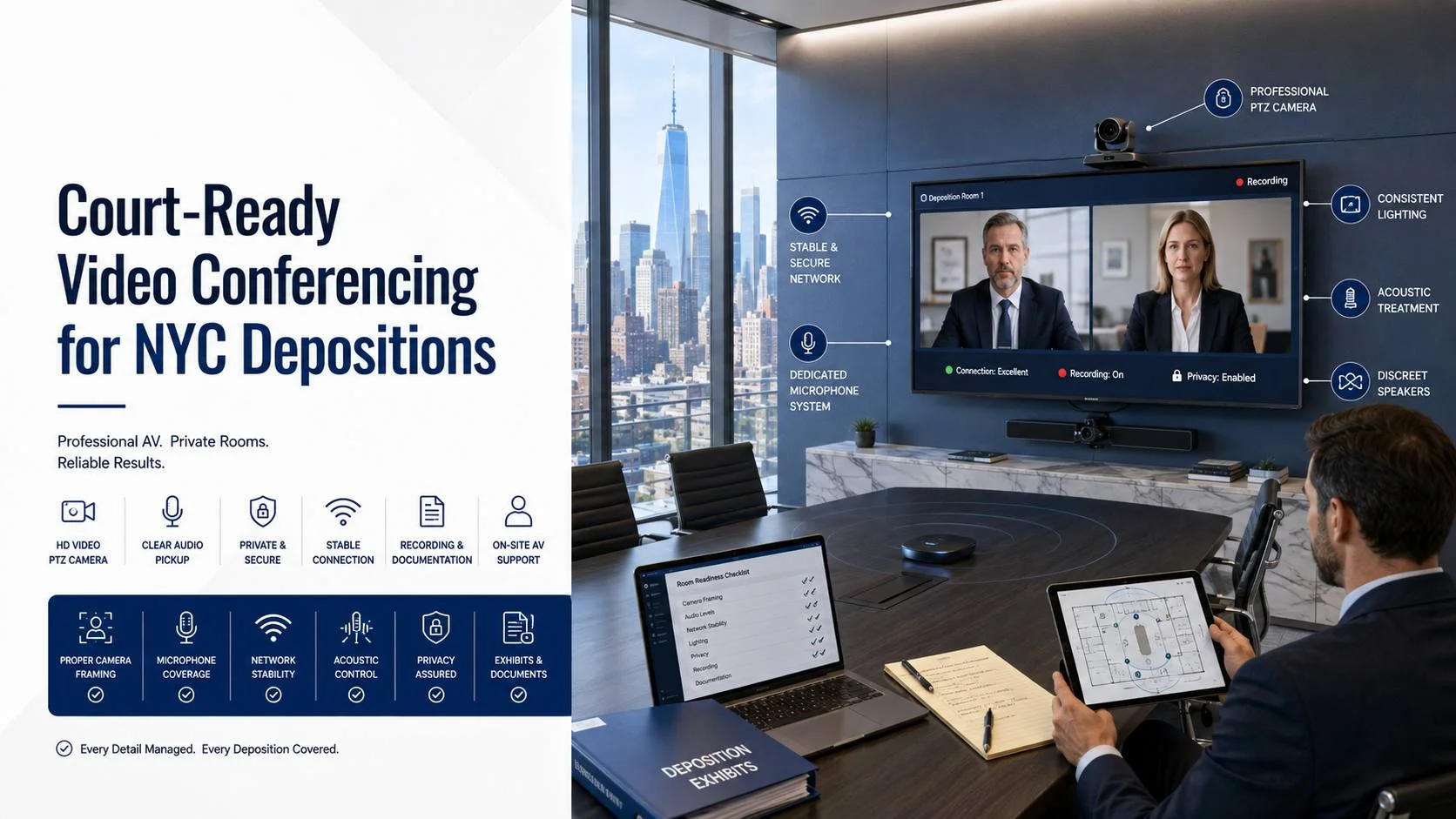
The transcript is the record. The video is the exhibit. A room that sounds perfectly fine on a Tuesday sales call can quietly damage both. Video conferencing for depositions in NYC gets held to a standard normal meeting rooms never face, because a court reporter has to catch every syllable, the recording has to survive an objection, and a witness gets judged on how they look at 1080p.
Most law firm conference rooms were built for partner meetings, not sworn testimony. They have a glass wall, a hard table, a wide-angle camera that frames six people at once, and a laptop plugged into an HDMI cable that somebody borrowed last week.
That works until it doesn’t. If you want the full picture of what a properly specified room takes, our video conferencing services page covers the wider build; this article is about the narrow, specific requirements that testimony adds on top.
Key Takeaways
- New York’s uniform rule for video-recorded depositions requires a time-date generator that permanently records hours, minutes and seconds, so a wall clock in frame does not satisfy it.
- Audio is the record. If reverberation time in the room is over 0.6 seconds, fix the room before you buy better microphones.
- The AI features that improve ordinary meetings, auto-framing, aggressive noise suppression and auto-gain, are the exact features you should switch off for testimony.
- Wired network only. Budget roughly 4 Mbps up and down per room with real headroom, and give the room its own path if the office WAN is shared.
- A dedicated court-ready room in Manhattan typically lands between $6,500 and $48,000 installed depending on room size, ceiling type and building access rules.
Why a Deposition Room Is a Different Animal
A normal conference room has one job: let people talk. A deposition room has four, and they compete.
It has to capture speech clean enough for a stenographer writing realtime. and produce a video file that survives review, editing and playback at trial. It also has to keep privileged conversation from ever reaching the record. And it has to do all of that without a technician sitting in the corner turning knobs.
Here’s the pattern we see on almost every glass-walled room above the 20th floor in Midtown: beautiful sightlines, terrible sound. Glass, gypsum, a solid-surface table and a polished concrete floor give you a reverberation time north of 0.8 seconds, and a reporter starts asking for repeats around the two-hour mark. Nobody blames the room. They blame the microphone.
One more thing separates these rooms. In an ordinary meeting, a dropped word costs nothing. In a deposition, a dropped word costs a line of transcript that somebody will argue about eighteen months later.
Video Conferencing for Depositions in NYC: The Rules That Shape the Room
New York’s rules are more prescriptive than most people expect, and several of them are physical requirements disguised as procedure.Under 22 NYCRR 202.15, depositions may be recorded by simultaneous audio and visual electronic recording, the notice or subpoena has to state that it will be videotaped along with the name and address of the operator and the operator’s employer, and the deposition begins with an on-camera statement covering the operator’s name and address, the employer, the date, time and place, and the party on whose behalf it is taken. The full text sits on Cornell’s Legal Information Institute, and it’s worth reading before you spec anything: 22 NYCRR 202.15.
The clause that trips up rooms is the timing requirement.Every video-recorded deposition has to be timed by a time-date generator that permanently records hours, minutes and seconds, and each time recording stops and resumes, those times have to be announced out loud. Permanently recorded means burned into the file. A clock on the wall behind the witness does not count.
CPLR 3113(d) Room Setup
On the remote side, CPLR 3113(d) lets the parties stipulate that a deposition be taken by telephone or other remote electronic means, and unless they stipulate otherwise, the officer administering the oath has to be physically present at the place of the deposition, with the extra costs falling on the party who asked for the remote format. Plan the room for a reporter in the seat, not a reporter on a screen.
Federal practice adds its own layer.The Southern District’s sample remote deposition protocols require every attendee to be visible and audible to the others, and, consistent with Local Rule 30.4, bar counsel from starting a private conference with the deponent while a question is pending, including by chat.
| Rule | What it says | What it forces in the room |
|---|---|---|
| 202.15(c) | Notice names the operator and their employer | A known, named operator, not whoever happens to be free |
| 202.15(d)(1) | Opening statement on camera; officer swears the witness on camera | Camera and mic have to cleanly capture the oath, not just the testimony |
| 202.15(d)(2) | Time-date generator recording hours, minutes, seconds | Burned-in timecode on the file, and a clean way to announce stops |
| 202.15(d)(3) | More than one camera permitted | A second angle for exhibits or wide shot is allowed, never required |
| 202.15(d)(4) | On-camera statement that recording is complete | Recording must not auto-terminate on a platform timer |
| 202.15(d)(5) | Technical data needed to replay or copy travels with copies | Deliverable format and codec matter; hand over something playable |
| CPLR 3113(d) | Remote by stipulation; officer physically present by default | Seat, sightline and power for the reporter in the room |
| SDNY Local Rule 30.4 | No private conference while a question is pending | Chat disabled or logged, breakout rooms controlled by the host |
Audio Is the Record: What the Reporter Actually Needs
Start with the room, not the gear. Get reverberation time under 0.6 seconds before you spend a dollar on microphones. In a typical 14-by-24-foot conference room that usually means 60 to 120 square feet of absorption on the two walls facing each other, plus carpet or a large rug if the floor is hard.
Background noise is the second number. Aim for NC-30 or quieter. A diffuser blowing directly over the table adds 4 to 6 dBA of broadband noise, and after enough ceiling-mic installs you learn to check the HVAC layout before you pick a mic position, not after.
Then choose the pickup pattern that fits the seating.
Ceiling arrays versus table mics
A ceiling array like the Shure MXA920 ships pre-configured to cover a 30 by 30 foot area and adapts automatically to talkers inside it, with the option to place up to eight defined coverage areas. That’s the right call for a 10 to 20 seat room where the table is fixed and you want nothing in front of the witness.
Table mics still win in two cases: ceilings above 12 feet, where the distance ratio gets ugly, and rooms with movable furniture. Our walkthrough of mic placement for boardrooms goes deeper on spacing, and if you’re weighing panels against a mic upgrade, the treatment versus better mics comparison is the honest version of that math.
One threshold worth memorising: mount ceiling arrays 9 to 10 feet above the floor where you can. Every foot higher costs you signal-to-noise you can’t get back with DSP.
The setting nobody thinks to turn off
Switch off aggressive noise suppression. Modern platforms will happily gate a witness’s quiet “no” into silence because it looks like a keyboard click. Auto-gain does something similar, pumping levels when the room goes quiet between questions, which drives a realtime writer up the wall.
Set gain manually, once, with the reporter in the seat. Then leave it. Proper meeting room sound calibration is a 90-minute job, not a setting you flip on install day.
Cameras, Framing and the On-Camera Clock
The witness is the shot. Everything else is secondary.
Frame a medium shot from mid-chest up, with the witness roughly centred and enough headroom that they don’t hit the top of frame when they lean forward. That framing has to hold for seven hours. It cannot pan away to whoever is asking the question.
Which means auto-framing gets disabled. Speaker tracking is a genuinely good feature in a normal room and a liability here, because the moment opposing counsel talks, the camera leaves the witness and the record loses the reaction. On boardroom AV solutions built for executive meetings we usually turn tracking on; in a deposition room we lock a preset and hide the remote.
A dedicated PTZ camera on the wall opposite the witness beats a video bar under the display, because the bar puts the camera 30 inches lower than eye line and the witness ends up looking down at everyone. If you’re comparing hardware, our video conferencing equipment page breaks down the camera classes by room depth.
For the timecode requirement, you have two routes. Either a recording appliance or software encoder that burns in a running time-date overlay, or a certified legal videographer who brings their own rig and handles it. Both are fine. Only one of them is a capital expense.
Lighting matters more than people expect. Two soft sources at roughly 45 degrees, 300 to 500 lux at the face, colour temperature matched to the room. Backlight from a west-facing window on a low floor will silhouette a witness by 4pm, and shades cost less than the argument about it.
The Network Is the Deposition
No camera fixes a bad network. This is the single most common root cause we find when a firm calls after a deposition went sideways.
Per Zoom’s technical library, gallery view can use around 2.0 Mbps for 25 video feeds and up to 4.0 Mbps for 49, and full frame rate content sharing pushes that higher again: calculating bandwidth usage. Build to roughly 4 Mbps up and down per room, then double it for headroom, then check what else shares that circuit at 10am on a Tuesday.
Hard requirements for a deposition room:
- Wired Ethernet to the codec and the reporter’s position. No Wi-Fi. Not once.
- A dedicated VLAN with QoS marking so a firmwide Teams migration doesn’t collide with sworn testimony.
- Jitter under 30ms and packet loss under 0.5% measured across a full workday, not a 60-second speed test.
- A documented failover path, whether that’s a second ISP or an LTE bridge, tested before you need it.
Our notes on bandwidth planning for meetings cover the measurement side, and the physical layer deserves the same attention. Cat6A to every position, plenum-rated where it crosses an air-handling space, terminated and labelled. Structured cabling for AV is the least glamorous line on the quote and the one that determines whether the room still works in 2031.
One NYC-specific note: on Manhattan build-outs the freight elevator window usually decides the schedule, not the equipment. A ceiling array with a four-week lead time is not your problem. A building that allows cable pulls only between 6pm and 11pm is.
Confidentiality and Control of the Record
Privileged conversation and an open microphone are a bad combination.
Give the room a hard mute with a physical indicator, ideally a table button or a touch panel state that everyone in the room can see from any seat. Software mute buried in a menu is not enough when a partner leans over to say something to a client.
Lock down the platform side too. Host controls stay with the reporter or the videographer. Chat is disabled or preserved. Recording permissions are restricted so nobody’s laptop starts a parallel cloud recording that later becomes a discovery headache. If your firm runs Microsoft, the meeting room security and compliance settings are worth reviewing with IT before the first deposition, not after.
Caucus space is a room requirement, not a nicety. A witness and counsel need somewhere private, and a small adjacent room with its own connection saves an hour of shuffling across a full day. If you have the square footage, spec it properly. If you don’t, a controlled breakout room with the host holding the keys is workable.
Platform choice follows the firm, not the room. A properly built Zoom Room installation and a properly built Microsoft Teams room installation both handle testimony fine, and both fail identically if the audio and network work underneath them is skipped.
If you want a second opinion on layout before anything gets ordered, our conference room design team can mark up a floor plan for sightlines and seat count in an afternoon.
What Video Conferencing for Depositions in NYC Costs to Build
Ranges, not quotes. The variables move these numbers a long way.
| Room tier | Typical scope | Installed range, NYC 2026 |
|---|---|---|
| Single-purpose room, 6 to 8 seats | Certified video bar, acoustic panels, wired network drop, locked camera preset | $6,500 to $14,000 |
| Law firm conference room, 10 to 14 seats | Ceiling array, dedicated PTZ, DSP, dual displays, touch control, treatment | $22,000 to $48,000 |
| Executive room with recording, 16+ seats | Second camera, exhibit feed, recording appliance with burned-in timecode, rack, redundant network | $55,000 to $120,000+ |
What moves the number: union labour rules in the building, after-hours-only access, COI requirements and how long the certificate takes to clear, ceiling type (hard lid means a plenum access plan and a longer install), core drilling approvals, freight windows, and whether the space is landmarked. Two identical rooms, one on West 38th and one in a 1920s tower downtown, can differ by 30% on labour alone.
The honest caveat
If your firm takes four depositions a year, don’t build this room.
Book the court reporting agency’s suite. They already own the timecode rig, the operator and the certification workflow, and they carry the risk. Building a $30,000 room to use it six times is a worse decision than paying a per-diem for a decade.
The build starts making sense somewhere around two depositions a month, or the moment confidentiality policy stops you from taking testimony off-site. Below that threshold, a $900 to $1,500 certified video bar in an acoustically treated room, paired with a videographer who brings the recording gear, covers you honestly.
Mistakes Worth Avoiding
- Buying microphones to solve a reverberation problem. Treat first. Every time.
- Leaving auto-framing on. The camera will leave the witness at the worst possible moment.
- Relying on Wi-Fi because the room is “only used occasionally.” Occasional use is when nobody notices the access point got moved.
- Skipping the burned-in timecode. A wall clock does not satisfy the time-date generator requirement.
- Letting the platform auto-end a long session. Seven-hour depositions outlast default meeting timers.
- Testing the room the morning of. Test it a week out, with the reporter, at the same time of day.
Where to Start This Week
Sit in the witness chair. Clap once and listen for the ring. Open a test call, mute the far end, and read a paragraph at conversational volume while somebody listens on headphones from another room. You’ll learn more in ten minutes than from any spec sheet.
Then run the four thresholds: reverberation under 0.6 seconds, background noise at NC-30 or quieter, a wired connection with 4 Mbps of clean headroom each way, and a locked camera preset that holds the witness for a full day.
If the room fails two or more of those, get a site survey before you buy anything. Video Conferencing NY is an NYC-based commercial AV and video conferencing integrator, and a survey for video conferencing for depositions in NYC covers acoustic measurement, network verification, camera sightlines from the witness position and a written scope you can put out to bid. Start with a room assessment and you’ll know within a week whether you’re treating a room or replacing a system.
Frequently Asked Questions
Are remote depositions allowed in New York?
Yes.CPLR 3113(d) allows the parties to stipulate that a deposition be taken by telephone or other remote electronic means, with a party participating electronically. The stipulation should spell out how the record is made, how exhibits are handled and who needs to be physically present. Video conferencing for depositions in NYC is routine now, but the format is agreed between the parties, not assumed.
Does a video-recorded deposition need a timestamp on screen?
New York’s uniform rule requires a time-date generator that permanently records hours, minutes and seconds, and any stop and resume has to be announced on the recording. In practice that means the timecode is part of the recorded file. A clock visible in the room does not meet the requirement.
What audio quality does a court reporter actually need?
Clean, consistent and close. Target reverberation under 0.6 seconds, background noise at NC-30 or below, and manually set gain that doesn’t move during the session. Turn off aggressive noise suppression and auto-gain, because both can mangle short answers that matter.
Can we run a deposition on a laptop and a USB camera?
For a low-stakes remote session with no video record, sometimes yes. For anything being recorded for trial use, the laptop mic will pick up the room, the camera sits below eye line, and there’s no timecode. A certified video bar in a treated room is the realistic floor.
How much does a court-ready deposition room cost in NYC?
Roughly $6,500 to $14,000 for a small dedicated room, $22,000 to $48,000 for a 10 to 14 seat conference room with a ceiling array and dedicated camera, and $55,000 and up for an executive room with recording and redundancy. Building access rules, ceiling construction and labour requirements move those ranges more than the hardware does.
If you’d rather have someone measure the room before you commit to a number, book a site survey and we’ll put the findings in writing.
About Video Conferencing NY
Video Conferencing NY is a commercial AV and video conferencing integrator based at 575 8th Avenue, Suite 1704, in Manhattan, serving New York City and the surrounding metro. The team designs, installs, wires, calibrates and supports Zoom Rooms, Microsoft Teams Rooms, Google Meet and Webex spaces, from huddle rooms to boardrooms, divisible rooms and town hall spaces.