
There’s a specific frustration that happens in boardrooms. The room looks right. The display is big, the camera is sharp, the table is impressive. Then the call starts and someone in Chicago says “I can barely hear the people at the far end of the table.” And then someone else says “there’s an echo.” And then the senior partner apologizes and the meeting quietly loses ten minutes of productive time before anyone’s gotten past introductions.
Every one of those problems traces back to microphone placement. Not the microphone brand. Not the conferencing platform. Where the microphone is, what it’s pointed at, how many there are, and whether the room is working with or against it.
Boardrooms in the 6 to 12-person range are a specific challenge. They’re large enough that a single microphone can’t do the job but small enough that people often assume it can. The table is usually long enough to create real coverage gaps. The room is often designed to look impressive rather than to support audio, which means hard surfaces everywhere and nothing absorbing reflections.
This guide covers the practical rules of microphone placement for this room size, the most common mistakes, and how to know whether what you have is actually working.
This guide covers one part of a larger subject. For the full picture, see our complete guide to room audio and lighting for video meetings.
Why Boardroom Mic Placement Is Harder Than It Looks
Walk into any random boardroom and test the audio. Sit at the far end of the table, speak at normal conversational volume, and listen to the recording. Most of the time it sounds thin, distant, or echoey. Sometimes it sounds like you’re in a different room from the microphone, even if you’re only eight feet away.
The reason is geometry. A 12-person boardroom table is typically 14 to 18 feet long. The microphone is usually somewhere in the middle. The person at the near end is four to five feet away. The person at the far end is nine to twelve feet away. At those distances, the direct signal from a distant voice is significantly weaker than from a close one, and the ratio of direct sound to reflected room sound has shifted. The microphone captures a muddy mix of voice and reverb rather than clean speech.
Now add the fact that people don’t always speak toward the microphone. They turn to address a colleague, they look down at their laptop, they lean back in the chair. Any of these reduces the on-axis level into the microphone and changes what remote participants hear.
Boardroom AV installation in executive spaces specifically addresses this geometry problem as a central design challenge, not a peripheral one. The microphone system has to be designed around how people actually behave in a meeting, not how they’d ideally behave to support the audio system.
Understanding Microphone Coverage Zones
Before specifying any microphone, understand the concept of coverage zones. Every microphone has a pattern, the area within which it picks up sound at a useful level. Outside that pattern, sound either isn’t captured at all or is captured at a level so far below the noise floor that it’s not intelligible.
For a standard omnidirectional boundary microphone sitting flat on the conference table, the practical coverage radius at conversational speech levels is roughly four to six feet in all directions above the surface. In a 16-foot table, that one microphone covers a circle in the middle and misses everyone outside that radius.
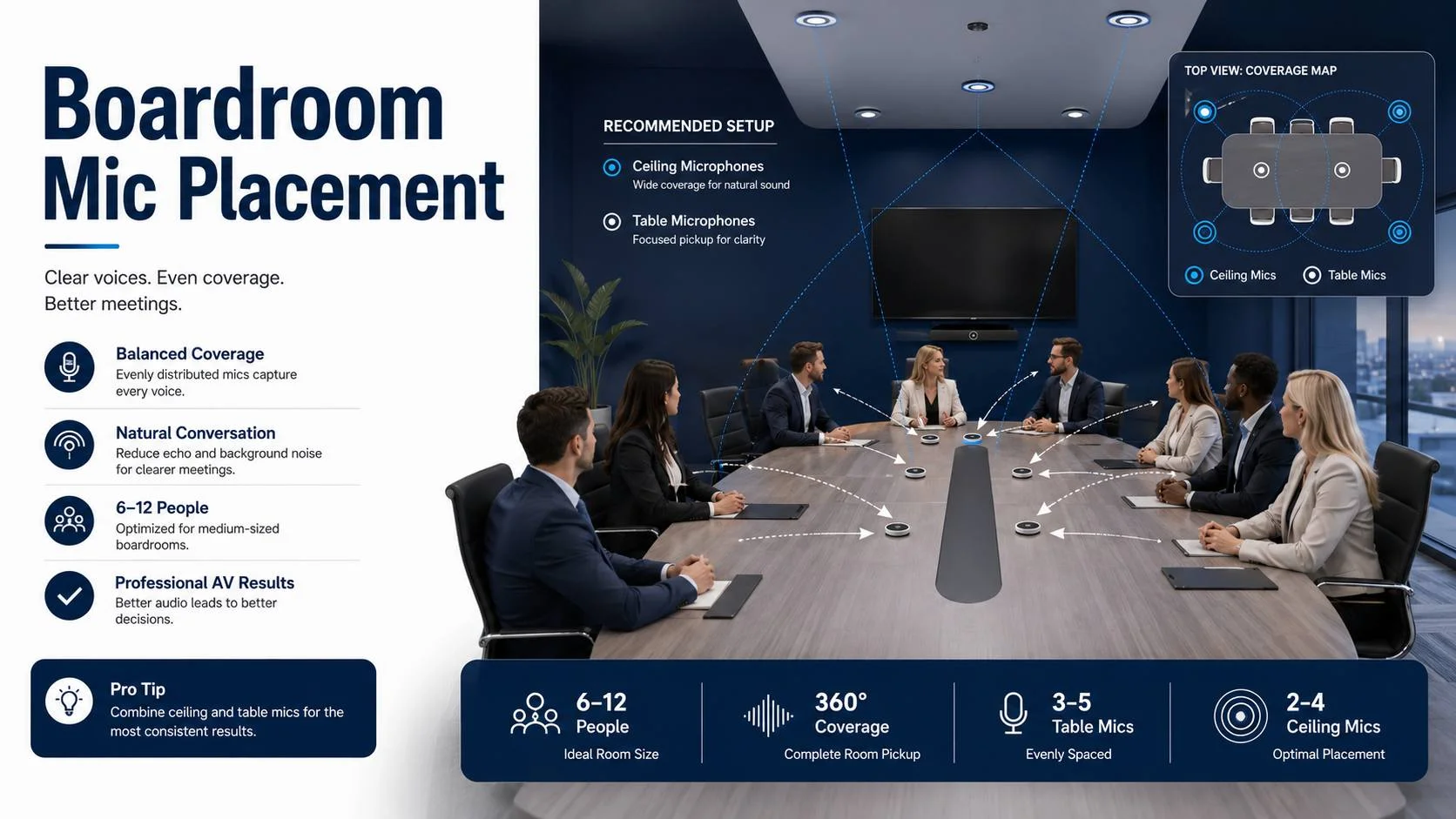
Beamforming microphones, either table-top pods or ceiling arrays, create directional virtual beams that focus toward speakers while rejecting off-axis sound. These can cover a wider area per device because the beams can be aimed across the length of the table rather than relying on proximity. But even the best beamforming system has practical coverage limits, and in a 12-person boardroom, one unit of anything is rarely enough.
The goal of microphone placement is continuous, even coverage with no seats falling outside the capture area. Every person at the table, regardless of where they’re sitting, should produce the same intelligible signal level for remote participants when speaking at a normal volume.
How camera and microphone layout work together in hybrid meetings covers the combined design challenge of coverage for both audio and video, since the microphone position and the camera position interact in ways that affect how the room performs overall.
Option 1: Boundary Microphones on the Table
The simplest approach and the most commonly deployed one. Boundary microphones sit flat on the conference table surface and pick up sound in a hemisphere above the table.
For a 6 to 8-person table in the 10 to 14-foot range, two boundary microphones placed in the left and right thirds of the table provide better coverage than one in the center. The logic is straightforward: two microphones cover two distinct zones, each handling the people nearest to it. The center of the table, which both microphones can reach, is double-covered, which is a comfortable redundancy rather than a problem.
For a 10 to 12-person table in the 14 to 18-foot range, two boundary microphones often aren’t enough. Add a third in the center, creating three coverage zones that overlap at the boundaries. This provides clean capture from every seat without any person being at the outer edge of a single microphone’s range.
Placement rules for boundary mics that matter:
Position them on the center line of the table, not pushed to one side. The hemisphere pickup pattern is symmetrical. Moving a mic off-center creates an asymmetric coverage zone and leaves seats on the short side poorly covered.
Space them evenly along the length of the table. Equal spacing means equal coverage distribution. Clustering two microphones in the center and leaving the ends uncovered is a common mistake that appears fine until someone sits at the end.
Keep them away from the edge of the table. A microphone at the very edge picks up the edge of the table as a boundary surface but also picks up whatever’s happening in the space below the table edge, including people’s legs moving, bags being shifted, and ambient floor-level noise. Two to three inches from the edge is the minimum. Center of the table width is better.
Keep them clear of obstructions. Laptops, water glasses, notebooks, and presentation materials placed between participants and the microphone attenuate the signal. In a real meeting, people put things on tables. The microphone placement needs to account for this rather than assuming the table surface will be clear.
Route cables through the table or through a floor box to keep the surface clean. Cables trailing across the table surface to a wallplate are a trip hazard and they look unprofessional. Clean cable routing for conference room equipment is part of what separates a professional installation from something that was put together in a hurry.
Option 2: Ceiling Microphone Arrays
Ceiling arrays are increasingly the standard for boardrooms that are being designed or renovated properly. They provide complete table coverage without anything on the table surface, which eliminates the placement, obstruction, and aesthetic issues entirely.
The most widely specified products in this category include the Shure MXA910 Ceiling Array, the Sennheiser TeamConnect Ceiling 2, and the Biamp Parlé ceiling microphone. Each uses a cluster of capsules with digital beamforming to create multiple simultaneous directional pickup beams across the coverage zone below.
The key advantage is that by being above the table, ceiling arrays are inherently less affected by table surface noise. Keyboard sounds, paper shuffling, cup placements, and the general mechanical noise of people working at a table all travel primarily along the table surface and are significantly weaker at ceiling height. The microphone is picking up the vertical component of speech projection, which contains more of the direct voice and less of the surface noise.
Ceiling height is the critical variable. Most ceiling array microphones are specified for ceiling heights of 8 to 14 feet. Within that range, they perform reliably with appropriate configuration. Below 8 feet, the array is close enough to the table that the beam geometry becomes less effective and the system needs to work harder. Above 14 feet, the direct-to-reflected ratio deteriorates as the voice signal weakens with distance while room reflections remain strong.
For boardrooms with ceilings above 14 feet, suspended ceiling array installations using drop-pole mounts bring the microphone down to a functional height. This is common in architecturally ambitious boardrooms with exposed ceilings or loft-style spaces. The pole mount needs to be properly integrated aesthetically, which requires planning during the design phase rather than retrofitting after the room is finished.
Position ceiling arrays directly above the table, centered on the seating zone. Not above the center of the room if the table is offset. The microphone is there to serve the people at the table, so it goes above the table. For a 12-seat boardroom, a single Sennheiser TeamConnect Ceiling 2 covers the full table if the ceiling height is appropriate. For rooms where the table is particularly long or the ceiling is at the upper limit of the specified range, two ceiling arrays placed above each half of the table provide more consistent coverage.
HVAC positioning is a critical site condition that ceiling array placement has to work around. A supply diffuser directly above the ceiling array injects continuous broadband noise at close range into a microphone optimized for sensitivity. The result is constant HVAC background sound in every call. Mark HVAC supply and return locations before finalizing ceiling array positions. If the ceiling layout puts a diffuser directly above the desired microphone position, move the microphone laterally by at least two feet or request an HVAC diffuser relocation during the construction phase.
Professional audio calibration for boardrooms after installation includes measuring the ceiling array’s capture from each seat and adjusting beam parameters to achieve consistent coverage. Factory defaults are a starting point, not a finished result.
Option 3: Beamforming Table Pods
Table pods like the Shure MXA310 and Biamp Devio sit on the table surface but use multiple capsules with digital beamforming to cover a larger area than a single boundary microphone. They’re designed for situations where ceiling installation isn’t feasible but a single boundary mic isn’t sufficient.
For a 10 to 12-person table, one table pod in the center often provides better coverage than two boundary mics, depending on the specific product and its beam count and range. The beamforming creates virtual microphones aimed at different sectors of the table, each independently capturing speech from its zone.
The trade-off is the object on the table. A table pod is a visible, center-of-table device. In a boardroom where aesthetics matter, this can conflict with the design intent. Some clients accept this easily. Others find it intrusive. If the boardroom’s visual design is important to the client, this is worth discussing before specifying table pods over a ceiling array.
Table pods also have the same obstructions issue as boundary mics. A centerpiece, a laptop, or a stack of documents placed in front of the pod changes its coverage. This is more of an issue in rooms where the table regularly has items placed in the center.
Combining Boundary Mics and Table Pods: When It Makes Sense
Some boardroom configurations benefit from a hybrid approach. A table pod or ceiling array providing primary coverage for the center and main seating zone, supplemented by a boundary microphone at each end of the table where the coverage of the primary device is weakest.
This is particularly relevant for unusually long tables, or tables with a U-shape or hollow square configuration. Standard U-shape table setups are notoriously difficult for microphone coverage because participants are seated along three sides of a rectangle rather than across a single line. The coverage zones overlap in the interior of the U while the ends may be poorly served.
For U-shape and hollow square configurations, ceiling arrays are almost always the better primary solution because they can cover a wider, more complex seating geometry from above. Supplemental boundary mics at the extremes of the configuration fill any remaining gaps.
Acoustic Treatment and Its Effect on Placement
The room’s surfaces determine how the microphone performs regardless of how well the microphone is positioned. This deserves emphasis because it affects everything else.
A hard-surfaced boardroom, which describes most of them, has a reverberation time that works against microphone performance. Sound from a speaker travels directly to the microphone, but it also reflects off the tabletop, the ceiling, the glass wall, the whiteboard, and the floor. These reflections arrive at the microphone slightly delayed and from multiple directions, which the microphone captures faithfully alongside the direct voice signal.
The DSP in professional conferencing hardware includes echo cancellation that addresses some of this. But echo cancellation has limits. When the reverberation is severe, the processing artifacts from trying to cancel complex reflections degrade the voice quality. The cleanest solution is treatment that reduces the reverberation before it reaches the microphone.
In a boardroom where renovation isn’t an option, the practical treatment additions are a rug under the table, fabric-upholstered chairs instead of hard plastic or mesh, and acoustic panels on the walls behind the end-seats and on the wall opposite the display. None of these require structural work and all of them measurably improve the microphone’s performance.
Budget allocation between room treatment and microphone hardware is a real design decision with significant impact on call quality. In many boardrooms, $2,000 in treatment produces a greater improvement than $2,000 in microphone upgrades, because the room is the limiting factor rather than the microphone.
Speaker Placement Relative to Microphone Position
The speakers in the room affect microphone performance through feedback and echo. The closer the speakers are to the microphone, the harder the echo cancellation has to work and the more risk there is of feedback if the cancellation is imperfect.
The optimal layout has the speakers at the display end of the room and the microphone coverage zone around the table. The maximum physical separation between the speaker output point and the microphone creates the best conditions for echo cancellation.
For in-ceiling speaker systems, position the nearest speaker at least six feet from the nearest microphone when possible. In a boardroom with ceiling arrays above the table and ceiling speakers throughout the room, some overlap is inevitable, but keep it minimal where the design allows.
Front-of-room speakers mounted above or beside the display are the preferred configuration for boardrooms. They provide voice localization, remote participants’ voices come from the direction of their image on the display, while maintaining maximum separation from the table-area microphones.
For rooms where the speaker and microphone placement creates unavoidable proximity, a high-quality DSP with advanced echo cancellation is the mitigating factor. Products like the Biamp Tesira, QSC Core, and Shure IntelliMix P300 handle the signal processing requirements of these configurations better than the embedded DSP in consumer conferencing codecs.
Platform-Specific Microphone Considerations
Different video conferencing platforms process audio differently, and those differences interact with microphone selection and configuration.
Zoom uses its own audio processing stack that handles noise suppression and echo cancellation on top of whatever the room hardware provides. When the room hardware is properly configured, Zoom’s processing is largely transparent. When the room hardware is undersized for the room, Zoom’s processing is noticeable because the artifacts of overworked DSP show through.
Zoom Room audio configuration for boardrooms involves matching the room’s microphone coverage and DSP settings to Zoom’s processing expectations. Microphones that are certified for Zoom Rooms have been tested to work within Zoom’s processing pipeline without introducing artifacts.
Microsoft Teams has its own audio processing with specific recommendations for room hardware. Microsoft Teams boardroom setup using Teams-certified microphone hardware ensures that the room’s audio processing and Teams’ cloud processing work in the same direction rather than potentially conflicting.
Google Meet room configuration follows similar principles. Meet’s audio processing performs best when the source audio from the room is clean and the room-level echo cancellation has done its job before the signal reaches Google’s cloud processing.
For organizations using Webex, the Cisco audio processing stack has specific preferences for microphone sensitivity and DSP settings that certified Webex room hardware is tuned to accommodate. Webex boardroom AV using certified hardware removes one layer of troubleshooting complexity when audio issues arise.
The 6-Person Room: A Specific Look
A 6-person boardroom, typically a table in the 8 to 12-foot range, is right at the upper end of what an integrated video bar’s microphone can handle in good conditions. In an untreated room with hard surfaces, the bar’s microphone often isn’t enough for the far seats.
The conservative specification for a 6-person room: one ceiling array or two boundary mics spaced at the one-third and two-thirds points of the table. Either approach provides consistent coverage with appropriate separation from the room’s speakers.
If the room is treated, the bar mic can perform adequately for a smaller table in this range. Test it from every seat before accepting it as the solution. The test is simple: join a call, sit in the chair farthest from the camera and microphone, speak at normal volume, and have someone on the far end confirm intelligibility. If they can hear you clearly without effort, the coverage is adequate. If they have to strain, it isn’t.
Small conference room AV design covers the spec decisions for smaller meeting spaces, which share principles with the lower end of the boardroom range.
The 12-Person Room: A Specific Look
A 12-person boardroom, typically a table in the 14 to 18-foot range, almost always needs a dedicated microphone system rather than an integrated bar. The table is too long for any bar-mounted microphone to cover adequately.
The practical options are a ceiling array sized for the room dimensions and ceiling height, or three boundary microphones spaced at the one-quarter, one-half, and three-quarter points of the table. For rooms where budget allows, the ceiling array is the better long-term choice because it keeps the table clear and performs better in moderately reverberant conditions.
Three boundary microphones is a perfectly functional configuration if the installation is done correctly. Spacing is the critical variable. Uneven spacing leaves gaps. Test every seat with the system running before sign-off.
In 12-person boardrooms that double as event spaces or hold larger capacity for town hall-style meetings, the microphone coverage needs to include the areas outside the table seating zone. Ceiling arrays are better suited for this dual-use requirement because they can cover a wider zone. Supplemental boundary mics on credenzas or at lectern positions can extend coverage to presenter areas.
Town hall AV and large-format meeting rooms require a different coverage approach from standard boardrooms, and when a boardroom doubles as a town hall space, that dual-use requirement should drive the microphone specification from the start.
Testing Microphone Coverage Before Sign-Off
No microphone placement is final until it’s been tested. This is not optional and it’s not something to skip because the timeline is tight.
The test protocol is straightforward. Run a call with a remote participant who can give honest feedback. Have someone sit in every seat at the table, one at a time, and speak at normal conversational volume. Not projecting, not leaning toward the microphone. Just talking the way they’d talk in a meeting. Have the remote participant confirm whether each position is clearly audible.
Document any seat that fails the test. Identify whether the failure is a coverage gap (the person sounds distant or quiet) or an acoustic problem (the person sounds echoey or muddy). Coverage gaps require microphone adjustments or additions. Acoustic problems require DSP tuning or room treatment.
Repeat the test after any adjustments. The room isn’t commissioned until every seat passes.
AV commissioning and testing for conference rooms as a formal process produces documented coverage verification rather than an informal “sounds fine” assessment. In a boardroom where executive conversations happen daily, the informal assessment is not good enough.
Cable Management and Infrastructure
The microphone system is only as good as the infrastructure supporting it. Improperly routed cables introduce noise. Cables with poor shielding pick up RF interference from other room electronics. Connections that aren’t properly terminated degrade the signal over the cable run.
For boundary microphones on a conference table, the clean solution is cables routed through the table leg or through a recessed floor box directly below the microphone position. The cable runs horizontally inside the table or straight down through the floor, not across the table surface.
For ceiling microphone arrays, plenum-rated cable run through conduit in the ceiling is the correct approach. The cable needs to be properly dressed and supported in the ceiling cavity. Dangling cable that contacts other building systems or that vibrates with HVAC airflow introduces noise.
Boardroom AV wiring best practices in commercial spaces covers the compliance and quality requirements for low-voltage cabling in occupied commercial buildings, which the microphone cable runs need to meet alongside the display and control system cabling.
AV rack and infrastructure design for boardrooms puts the microphone system DSP, amplification, and conferencing codec in a properly organized equipment rack where cable management, ventilation, and serviceability are all addressed together.
When to Call a Professional
There’s a clear line between boardroom microphone work that’s appropriate for an internal IT team and work that requires a professional AV integrator.
Replacing an existing boundary microphone with a new one of the same type, in the same position, through the same cable infrastructure: reasonable for an IT team.
Specifying and installing a ceiling array system, programming the beam parameters, calibrating the DSP, integrating with the room control system, testing coverage from every seat, and producing commissioning documentation: professional AV work.
The more complex the system, the more clearly it falls into professional territory. A 12-person boardroom with a ceiling array, a dedicated DSP, integrated platform control, and testing against enterprise-standard coverage requirements is a professional installation project.
Video Conferencing NY designs and installs boardroom audio systems for New York offices, covering microphone system selection, placement, DSP programming, and coverage testing as part of a complete room solution. The boardroom is where your organization’s most important conversations happen. Getting the microphone right is how you make sure those conversations actually land on the other end of the call.
Custom boardroom conference room design that integrates microphone coverage into the room design from the beginning, rather than treating it as an installation detail at the end, produces reliably better results. The microphone positions, HVAC layout, speaker placement, and room treatment all interact, and they’re much easier to optimize together than to fix independently after the room is built.
The boardroom exists to facilitate important decisions. The audio system exists to make sure the people who need to be part of those decisions can actually be heard, whether they’re in the room or on the call. That’s the job the microphone placement has to do, and it’s worth doing right.