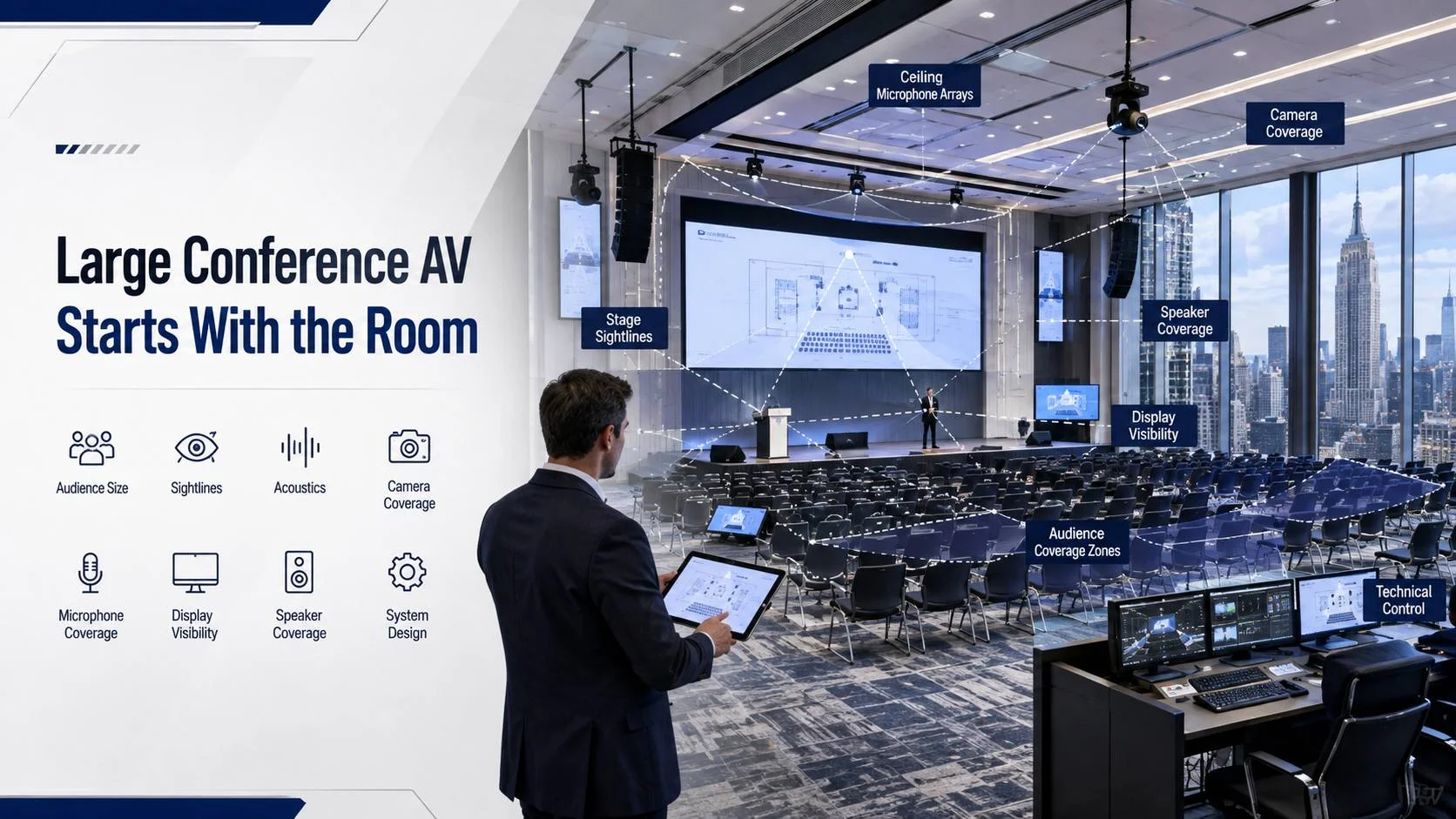
Before choosing cameras, microphones or displays, document these five things:
Room dimensions, seating count, stage position, audience viewing distance and the intended conference format.
The most useful first step is a measured site survey. Record the room length and width, ceiling height, locations of columns, windows and doors, available power, existing cable pathways, network drops and any areas where equipment can be safely mounted or stored.
Then map the audience.
A conference system has to work for the person sitting in the first row and the person sitting farthest from the presentation. AVIXA’s ANSI/AVIXA V202.01:2026 standard addresses display image size and relative viewing positions for both basic and analytical decision-making needs, and it applies to permanent and temporary systems.
AVIXA’s display image size guidance can be used as a design reference when deciding how large the displayed image needs to be for the audience.
Imagine a 180-person conference in a long Midtown room. If the farthest attendee is too far away from a single front display, increasing brightness won’t solve the problem. You may need a larger image, multiple displays, confidence monitors or a different seating and stage arrangement.
That is why the room should determine the AV system rather than the equipment catalog.
What Should Your Large Conference AV Plan Include Before Equipment Is Ordered?
A useful planning package should answer at least seven questions before purchasing equipment.
| Planning Area | What To Document | Why It Matters |
|---|---|---|
| Audience | Seating count and sightlines | Determines display and audio coverage |
| Program | Presentations, panels, Q&A, video playback | Determines inputs, microphones and switching |
| Stage | Podium, panel table, confidence monitors | Determines camera and microphone positions |
| Remote participation | Teams, Zoom, Webex or other platform | Determines cameras, DSP and network requirements |
| Room | Ceiling, walls, windows and partitions | Affects speakers, microphones and reflections |
| Infrastructure | Power, network, cable routes and rack location | Determines installation feasibility |
| Building logistics | Freight, loading, access and work hours | Determines schedule and labor planning |
This is also the stage where you should decide if the event is primarily in-room, hybrid or fully dependent on remote participation.
A pattern we see on large AV build-outs is that the most expensive change often happens because the program changed after the system was designed. A simple keynote can turn into a three-camera panel, a remote guest, audience Q&A and confidence-monitor playback. Each added requirement changes the signal flow.
Write the event sequence first.
If the run of show says “podium speech, 20-minute presentation, panel discussion, audience Q&A, remote guest and closing video,” the AV design team can work backward from those moments instead of guessing what equipment seems impressive.
How Do You Design Audio for a 100 to 300 Person Conference?
Audio needs to be planned around coverage, speech intelligibility and microphone positions, not just total speaker wattage.
For a large conference, divide the room into listening zones and determine where people will speak. A podium microphone, panel microphones, audience Q&A microphones and remote participant audio all create different signal paths.
Ceiling arrays such as Shure MXA series microphones can work well in appropriate rooms, but they aren’t automatically the best answer. Table microphones can be simpler for fixed panel seating, while wireless handheld microphones may make more sense for audience Q&A.
Room reflections matter too.
A glass-walled conference room with hard flooring can create enough reverberation to make a microphone system sound worse even after you add better microphones. After enough ceiling-mic installations, you learn that microphone selection can’t compensate indefinitely for a difficult room.
As a practical design target, if measured reverberation time is above roughly 0.6 seconds in a speech-focused conference room, investigate the room itself before simply adding more microphones. The exact acceptable value depends on room size, finish materials and program requirements, but the threshold is useful as a warning sign.
Speaker coverage should also be consistent across the audience area. Avoid designing a system where the first five rows are loud while the back half of the room struggles to follow speech.
For a conference with panels and remote participants, include acoustic treatment, microphone placement and DSP tuning in the plan. The goal isn’t maximum volume. The goal is clear speech at every seat.
A useful supporting resource for clients comparing room hardware is the conference AV equipment buying guide, particularly when the equipment list starts growing beyond a simple presentation setup.
How Do You Size Displays and Cameras for a Large Conference?
Display sizing begins with viewing distance and content type.
A presentation showing detailed financial charts needs more visual detail than a keynote with large text and simple graphics. AVIXA’s V202.01 standard separates basic and analytical viewing needs, which is useful when a conference contains both general presentation content and material that requires closer inspection.
For large conference rooms, consider more than one visual layer:
Main presentation display: The primary image for slides, videos and shared content.
Confidence monitor: A display facing speakers so they can follow timing, notes or presentation content without turning away from the audience.
Return or overflow displays: Additional screens positioned for attendees who sit far from the main screen.
Stage displays: Useful when presenters need visible cues or participant information.
Camera planning follows a similar principle.
Don’t simply buy the camera with the highest resolution. Decide what the remote audience needs to see. A wide shot may work for a keynote, while a panel discussion may need tighter framing and presenter tracking.
A large room can also benefit from separate cameras for the presenter and audience or panel area, depending on the platform and event format. Camera placement should avoid blocked sightlines, extreme angles and distracting movement.
For a hybrid event, test the actual camera framing from the remote viewer’s perspective. The room can look excellent in person while the remote audience sees a tiny speaker at the edge of the frame.
How Should You Build the AV System in Layers?
A strong conference design is easier to troubleshoot when the system is separated into logical layers.
Start with sources. These may include presentation laptops, wireless presentation systems, media playback, cameras, document cameras or remote video feeds.
Next comes signal processing. This can include video switching, scaling, audio DSP, echo cancellation and control.
Then comes distribution. Depending on the size of the room, this may involve direct HDMI connections, extenders or AV over IP.
The final layer is endpoints: displays, projectors, speakers, microphones and operator interfaces.
This separation matters because failure becomes easier to isolate.
If one presentation laptop stops showing on the confidence monitor, you should be able to determine whether the problem is the source, switcher, distribution path or display without rebuilding the system mentally during the event.
For a large installation, document every major connection and label both ends of every cable. AVIXA also maintains standards covering AV cable labeling, system documentation and performance verification.
A properly organized equipment rack should allow technicians to identify devices and connections quickly. That matters even more in Manhattan buildings where the rack may be remote from the conference space.
What Network and Cabling Requirements Matter for Large Conference AV?
The network is part of the AV system.
Modern conference rooms can carry presentation content, camera traffic, control traffic, monitoring, remote meeting traffic and device management over the same corporate infrastructure. That means network planning needs to happen before installation.
For Microsoft Teams Rooms deployments, Microsoft recommends confirming physical site readiness, networking, power and installation requirements before deployment. Microsoft also identifies bandwidth, QoS, firewall, proxy and certificate considerations as part of the network preparation process.
Use that same mindset for a large event even when Teams isn’t the primary platform.
Ask the IT team for the intended VLAN, QoS policy, switch ports, firewall requirements, IP addressing process and Internet capacity. Don’t wait until commissioning day.
Cabling should also match the building environment.
Plenum-rated and riser-rated cable aren’t interchangeable simply because both are available in the same category. Cable selection depends on where the cable is installed and the applicable code requirements. NFPA 70 materials distinguish plenum and riser applications and specify listing requirements for different installation environments.
For NYC projects, also confirm pathway access, firestopping requirements and building-specific rules with the responsible professionals.
A common field lesson is simple: the AV rack location can be perfect on the floor plan and terrible in the real building. Before finalizing it, check distance to the room, available power, cooling, network connectivity, service access and the actual path for cable installation.
For more detailed infrastructure planning, see the guide to AV infrastructure wiring and cable management.
How Do You Plan AV for Large Conferences in New York Buildings?
The NYC part of the project starts long before the first cable is pulled.
Large Manhattan buildings can have controlled loading docks, scheduled freight elevators, certificate of insurance requirements, union labor rules, security procedures and restricted installation hours. Those details can affect the schedule even when the AV equipment is already sitting in a warehouse.
On NYC build-outs, the freight elevator window can decide the schedule, not the equipment.
Build a logistics sheet that includes:
| Item | Check Before Installation |
| Loading | Delivery time and loading dock reservation |
| Freight | Elevator size, weight and booking window |
| Access | Security registration and contractor access |
| Insurance | COI requirements and building limits |
| Work hours | Regular, early morning or after-hours access |
| Storage | Secure location for equipment before installation |
| Cabling | Approved pathways and ceiling access |
| Disposal | Packaging removal and building procedures |
For projects involving multiple floors, add a floor-by-floor equipment map. Label where racks, displays, microphones, network devices and control points will sit.
If the venue is a hotel or conference center, also determine which house AV systems must remain active and which parts of the system can be integrated with the client’s equipment.
For a divisible ballroom, for example, the control strategy should account for both combined and separated room modes. The same speakers, microphones and displays may need to behave differently depending on how the partitions are configured.
The divisible room AV systems page provides a useful reference for that type of requirement.
What AV Equipment Does a Large Conference Usually Need?
There isn’t one universal equipment list, but most large conference systems can be organized into the categories below.
| System | Typical Requirement | Planning Question |
| Displays or projection | Main and secondary viewing positions | Can everyone read the content? |
| Presentation switching | Multiple inputs | How many sources are active? |
| Cameras | Presenter, panel and optional audience | What does the remote audience need to see? |
| Microphones | Podium, panel, wireless and Q&A | Who speaks and where? |
| DSP | Echo cancellation, mixing and processing | How will local and remote audio interact? |
| Speakers | Zoned coverage | Is speech intelligible at every seat? |
| Control | Touch panel, buttons or operator control | Who runs the system during the event? |
| Network | Dedicated or managed connectivity | How will devices communicate? |
| Rack | Processing, switching and networking | Is there enough service access? |
| Power | AV and network equipment | Is power available at every endpoint? |
A $900 all-in-one video bar can be the correct purchase for a small executive meeting, but it isn’t automatically the correct solution for a large conference.
That’s an important caveat.
Don’t buy more equipment simply because the event is important. Buy the equipment that solves the actual program requirements.
A large room with one presenter and no hybrid component may need a simpler system than a 75-person executive event with remote participants, multiple presentation sources and live audience microphones.
For larger procurement decisions, the commercial video conferencing systems resource can help separate platform requirements from hardware requirements.
How Should You Test a Conference AV System Before Go-Live?
Testing should happen in stages rather than as one final check.
Stage 1: Individual device testing. Confirm every display, microphone, speaker, camera, processor, switcher and network device powers on and operates correctly.
Stage 2: Signal-path testing. Send each input through the complete system and verify the expected output.
Stage 3: Audio testing. Walk the room and verify speech coverage, microphone levels, echo cancellation, feedback control and remote audio.
Stage 4: Platform testing. Join the actual meeting or event platform and test camera switching, content sharing, remote audio and return video.
Stage 5: Program rehearsal. Run the event sequence from start to finish.
That last step catches problems that individual tests miss.
Run the podium presentation. Switch to the panel. Bring in the remote guest. Pass a Q&A microphone into the audience. Play a video. Share content. Switch cameras. Test the confidence display.
Then repeat part of the process with the people who will actually operate the room.
Microsoft’s current Teams Rooms deployment guidance also emphasizes physical deployment, configuration and testing, including test calls and checking management visibility after deployment.
For broader audio and lighting work, conference room sound and lighting calibration can be part of the final commissioning stage.
What Should You Check on the Day Before the Conference?
Do a final room walk instead of relying on the previous night’s test.
A useful self-audit takes less than an hour if the system has already been commissioned.
- Every presenter laptop or adapter is available.
- Presentation files open correctly.
- Main displays show the correct source.
- Confidence displays show the correct content.
- Podium microphone is charged or connected.
- Panel microphones are identified and labeled.
- Audience Q&A microphones are tested.
- Camera framing matches the event program.
- Remote participants can hear the room clearly.
- Room participants can hear remote participants.
- Video playback has been tested with the actual file type.
- Network connectivity is stable.
- Control panels are responsive.
- Backup presentation content is available.
- Spare batteries, adapters and cables are on site.
- Equipment rack access is clear.
- The building’s loading and security procedures are complete.
A pattern we see in real installations is that the final issues are often operational rather than technical. Someone changed a laptop resolution. A presenter arrived with the wrong adapter. A wireless microphone wasn’t returned to its charging station. A panelist moved to a different seat.
Good AV planning leaves room for those human variables.
What Are the 7 Common Mistakes to Avoid?
1. Choosing Equipment Before Mapping the Event
A product list isn’t an AV design. Start with the event sequence and room requirements.
2. Using One Display for a Deep Room
A large front screen can still leave distant attendees struggling to read detailed content.
3. Adding Microphones Without Addressing the Room
More microphones won’t automatically fix reflections or poor speech intelligibility. Treat the room when the room is the problem.
4. Treating the Network as Someone Else’s Job
Modern AV depends on networking. Bring IT into the planning process early.
5. Ignoring Building Access
A 10:00 AM installation may be impossible if the freight reservation is at 8:00 AM and the building requires security registration beforehand.
6. Leaving Control Until the End
The operator interface should reflect how the event actually runs. If switching between three presentation modes requires five separate actions, simplify it before show day.
7. Testing Only the Equipment
A microphone can pass a bench test and still fail during a real panel discussion. Test the complete event workflow.
The cheapest correct solution is often the one with fewer failure points.
What Is a Realistic NYC Budget for Large Conference AV?
Pricing varies too much for one fixed number to be useful, but a realistic commercial AV planning range can be established once room size, complexity and building conditions are known.
For a conference system in a commercial NYC environment, a rough planning range might be $15,000 to $40,000 for a relatively straightforward installed system, $40,000 to $100,000+ for a more advanced hybrid conference environment, and significantly higher for complex divisible rooms, large-format projection, extensive control, multi-camera production or high-end DSP and infrastructure.
These are planning ranges, not quotes.
The variables that can move the number include room size, display count, projection requirements, ceiling type, microphone count, DSP complexity, rack size, network infrastructure, union labor requirements, freight windows, COI requirements, after-hours access, existing cabling and how much construction work is required.
Temporary event staging can also follow a different cost structure from a permanent installation.
Before approving a budget, ask for the equipment scope, installation labor, programming, commissioning, cabling, project management and building-related charges to be separated clearly.
That makes it much easier to compare proposals.
What Should You Ask an AV Installer Before Signing?
A good proposal should answer more than “which equipment are you using?”
Ask the installer to explain the signal flow, room coverage, network dependencies, control method, installation schedule and testing process.
Ask how the design handles:
Presenter changes. Can a new laptop be connected without disrupting the meeting?
Remote speakers. Can a remote participant hear and be heard naturally?
Panel discussions. Can multiple microphones operate without creating echo or feedback?
Audience Q&A. How will the audience microphone reach the system and remote attendees?
Failure recovery. What happens if a source, display or network path fails?
Service access. Can technicians reach the equipment without dismantling finished construction?
Documentation. Will the final system include drawings, cable labels, equipment schedules and operating instructions?
This is where a professional AV installer should be able to explain the design in plain language.
Video Conferencing NY is an NYC-based commercial AV and video conferencing integrator, so its role on this type of project is focused on designing, installing, wiring, calibrating and supporting commercial conferencing environments rather than simply supplying individual pieces of equipment.
What To Do Before You Get Quotes for a Large Conference
Don’t send three installers the same room name and ask them for “a conference AV system.”
Send a measured room plan, seating count, event agenda, presentation requirements, preferred video platform, camera requirements, microphone requirements, desired controls and the building’s access rules.
Then ask each vendor to return a clear scope.
A useful scope should show equipment, labor, programming, cabling, commissioning, training and any assumptions about network or electrical work.
Before requesting quotes, review your current conference room AV equipment requirements and write down what the room must accomplish rather than which brands you think you need.
For a more complicated NYC project, a site assessment can also prevent the proposal process from becoming a guessing exercise.
How to Plan AV for Large Conferences in New York: Start This Week
The best way to plan av for large conferences in new york is to work backward from the event itself. Define who needs to see what, who needs to hear what, how the room will operate, how remote participants will join and what the building will allow.
Then turn those answers into a room plan, equipment schedule, infrastructure plan and test procedure.
Before collecting quotes, have an AV professional review the room, sightlines, audio coverage, network dependencies and installation logistics. A properly scoped commercial AV installation in New York can give you a written path from site survey to commissioning instead of leaving those decisions until installation day.
Frequently Asked Questions
How far in advance should I plan AV for a large conference in NYC?
Start planning several weeks before installation, and earlier when the project involves construction, complex networking, multiple rooms or strict building access rules. The exact schedule depends on equipment availability, site readiness, freight access and the scope of custom installation.
Does a large conference always need ceiling microphones?
No. Fixed panel seating may work better with table microphones, while audience Q&A may benefit from wireless handheld units. Ceiling arrays become more attractive when seating is flexible or table microphones would interfere with the room layout.
Is a video bar enough for a large conference?
Usually not for a complex conference with multiple presenters, audience microphones and several cameras. An all-in-one bar can be the right solution for a smaller room with a straightforward meeting workflow, but larger events generally require more deliberate audio, video and control design.
How much bandwidth does conference room AV need?
The requirement depends on the platform, devices and network design. Microsoft currently recommends 10 Mbps up and down per Teams Room as a planning recommendation, while enterprise environments also need to account for QoS, firewall, proxy and certificate requirements.
What is the most important part of large conference AV planning?
Start with the audience and event workflow. Sightlines, speech intelligibility, network readiness, control simplicity and building logistics usually matter more than choosing the newest equipment.
Plan your large conference AV project with a site-focused commercial AV assessment.
About Video Conferencing NY
Video Conferencing NY is an NYC-based commercial AV and video conferencing integrator located in Manhattan. The company designs, installs, wires, calibrates and supports commercial conferencing environments, including conference rooms, boardrooms, town halls and other professional AV spaces.