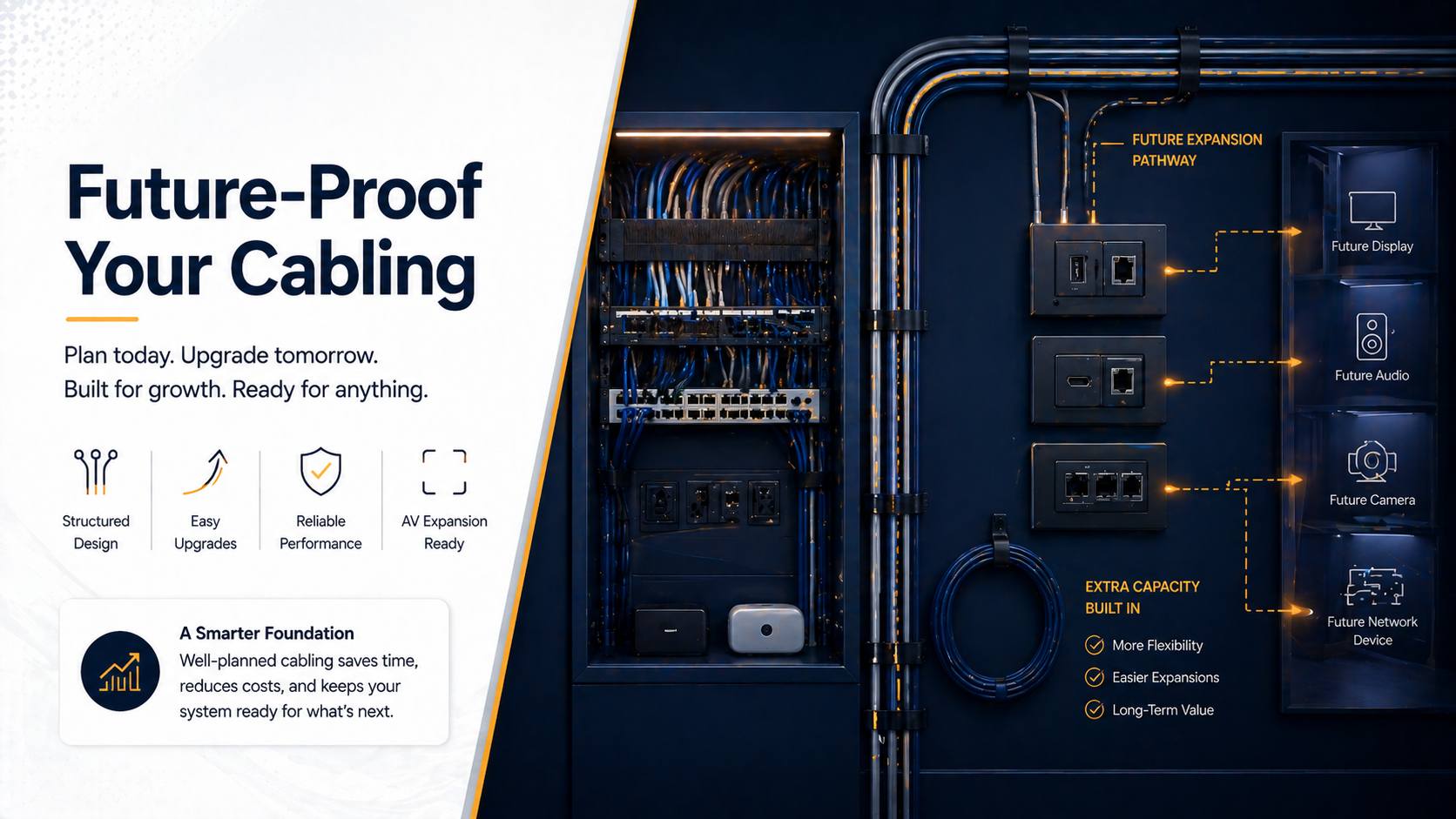
You wire a conference room perfectly for today’s needs. HDMI to the display, Cat6 for network, a few power outlets. Two years later you need to add cameras, upgrade to 4K, add wireless presentation. Now you’re stuck running surface-mount raceways or tearing open walls because you didn’t plan ahead.
Here’s the reality: AV technology evolves fast. What’s cutting-edge today is outdated in 3-5 years. The cables you install now will outlive multiple equipment generations—or they should if you do it right. The difference between future-proof infrastructure and infrastructure that limits you is planning, over-provisioning, and choosing the right cable types.
I’ve designed cabling for hundreds of conference rooms and AV installations. The ones that age well have excess capacity, flexible pathways, and cable types that support future technologies. The ones that require expensive retrofits were under-provisioned or used obsolete cable types from day one.
This guide covers exactly how to future-proof your AV cabling—choosing cable types that last, over-provisioning strategies, conduit installation, labeling for future changes, and planning for technologies that don’t exist yet.
Let’s build infrastructure that supports your next three equipment generations, not just today’s.
Understanding Cable Lifespan vs Equipment Lifespan
The fundamental disconnect that requires future-proofing.
Equipment Gets Replaced Every 3-7 Years
Typical refresh cycles:
- Video conferencing equipment: 3-5 years
- Displays: 5-7 years
- Network switches: 5-7 years
- Control systems: 7-10 years
Why replacement happens: Technology advances, equipment fails, features become essential that old equipment lacks.
Cables Last 15-30+ Years
Properly installed cables: Last decades if quality and spec are adequate.
Infrastructure permanence: In-wall cables and conduit are permanent. Changing them is expensive and disruptive.
The math: Your cables will outlast 3-5 equipment generations. Plan accordingly.
The Planning Imperative
Install today for tomorrow: What technology will you need in 5 years? 10 years?
Over-provision: More cables and bigger conduit than current needs dictate.
Future-proof types: Choose cable specs that exceed current requirements.
Flexibility: Design infrastructure that allows changes without demolition.
When planning complete conference room installations, cabling strategy determines long-term adaptability.
Choosing Future-Proof Cable Types
Specific cables that won’t become obsolete quickly.
Cat6a: The Network Backbone
Why Cat6a over Cat6:
- Supports 10 Gigabit Ethernet up to 100 meters
- Cat6 supports 10 Gig only to 55 meters
- Better shielding (less interference)
- Future standards will likely require Cat6a minimum
Cost difference: Minimal. $20-40 more per 1000 feet.
Installation: Slightly thicker, stiffer cable. Requires more care with bend radius.
Lifespan: Will support network needs for 15+ years easily.
Where to use: Every network drop. Conference rooms, offices, equipment racks.
Alternative: Cat6 acceptable if budget tight and runs under 55 meters. But Cat6a is smarter investment.
Fiber Optic: Long-Term Video Solution
Why fiber for video: Bandwidth essentially unlimited. Supports any resolution, any frame rate.
Current use: 4K and 8K video transmission, long cable runs (over 100 meters).
Future use: Whatever comes after 8K. 16K? VR? Holographic? Fiber handles it.
Types:
- Single-mode: Longer distances (1000+ meters), more expensive
- Multi-mode: Shorter distances (300-500 meters), cheaper, adequate for buildings
Cost: Higher than copper ($100-200 per run). But future-proof for video.
Installation: Requires expertise. Termination needs training. Hire professionals.
Where to use: Main video runs where future upgrades likely. Building backbones. Long distances.
HDMI vs HDBaseT Consideration
HDMI limitations:
- Max 50 feet for passive cables
- Active cables extend to 100 feet
- Each new spec requires new cable (HDMI 2.1 different from 2.0)
HDBaseT advantages:
- Uses Cat6a (future-proof already)
- Supports 4K now, likely 8K future
- Single cable: video, audio, power, control, network
- Up to 328 feet
Strategy: Use HDBaseT over long runs. Terminates to HDMI at endpoints. Upgrading means new transmitter/receiver, not new cable.
Cost: Cat6a cable cheap. HDBaseT equipment $200-500 per endpoint.
Power Infrastructure
Today’s needs: USB-C power delivery, PoE for cameras and devices.
Tomorrow’s needs: Higher power requirements, more PoE devices.
Strategy:
- Run extra Cat6a for future PoE
- Consider dedicated power circuits in equipment areas
- Larger conduit allows adding power cables later
PoE evolution: PoE++ (71W) today. Higher power standards coming. Cat6a supports them.
Over-Provisioning Strategies
Running more cables than you currently need.
The 2x Rule
Concept: Run twice as many cables as current equipment requires.
Example: Conference room has one camera. Run two Cat6a cables to camera location.
Why: Adding second camera later requires no new cabling. Ready to go.
Cost: Cable is cheap. Labor is expensive. Running extra cable during initial install adds minimal cost.
ROI: Avoiding one future cable retrofit pays for all the extra cables you run initially.
Strategic Cable Placement
Every potential equipment location:
- Camera positions (current and possible future)
- Display locations (even walls without displays now)
- Microphone points (table, ceiling)
- Control panel locations
- Equipment rack areas
Each location gets:
- 2-4 Cat6a cables minimum
- 1-2 HDMI or HDBaseT
- Conduit for future additions
Seems excessive? Not when you avoid $300-500 per retrofit cable run later.
Home Runs vs Daisy Chains
Home run: Each cable runs directly from equipment to central location (rack, IDF).
Daisy chain: Cables interconnect between locations.
Future-proof choice: Home runs. Provides flexibility. Any cable can be repurposed.
Central location: All cables terminate at one accessible location. Patch panel makes changes easy.
Example:
- Four Cat6a home runs from conference table to rack
- Can use for network, video, control, or future needs
- Rearrange usage without rewiring
When building AV infrastructure with proper planning, home runs provide maximum long-term flexibility.
Conduit: The Ultimate Future-Proofing
Pathways that allow cable changes without demolition.
Why Conduit Matters
Cable changes: Technology evolves. Cables need replacement or addition.
Without conduit: Cut drywall, fish new cables, patch, paint. $500-2,000 per run.
With conduit: Pull out old cable, pull in new cable. $50-200 per run.
The math: Conduit installation costs more initially. Saves exponentially on future changes.
Conduit Sizing Strategy
Standard approach: Size conduit for current cables. 40% fill ratio per code.
Future-proof approach: Size conduit for 2-3x current cable count.
Example:
- Current: 4 Cat6a cables
- Minimum conduit: 1 inch (holds 4 cables at 40% fill)
- Future-proof: 1.5 or 2 inch (holds 9-16 cables)
Cost difference: $2-5 per foot. Totally worth it.
Strategic Conduit Runs
Where to install conduit:
- Display locations to equipment rack
- Conference table to equipment rack
- Ceiling camera positions to rack
- Wall-mounted device locations to rack
- Between equipment closets/racks
Accessible points: Pull boxes at strategic locations. Allows accessing cables mid-run.
Flexibility: Can pull different cable types as needs change. Fiber today, who knows what tomorrow.
Types of Conduit
EMT (metal conduit): Durable, required in some commercial applications, provides grounding.
PVC: Cheaper, easier to work with, adequate for most uses.
Flexible conduit: Short runs with bends. Not for long runs.
Surface mount vs in-wall: In-wall during construction. Surface mount for retrofits.
Planning: Install conduit during construction or renovation when walls are open. Retrofit conduit is visible.
Cable Management Infrastructure
Organization that enables future changes.
Patch Panels
What they are: Central termination point for all cables.
Why essential:
- All cables accessible in one location
- Changes made with patch cables, not rewiring
- Organization prevents confusion
- Testing easier
Implementation:
- Every cable terminates at patch panel
- Labeled clearly
- Equipment connects to patch panel via short cables
Future changes: Need different video source? Patch cable change. Done.
Cable Labeling Standards
Both ends labeled: At equipment end and at patch panel.
Label includes:
- Room identifier
- Destination/purpose
- Cable type
- Installation date
- Cable number
Example: “CR-301-DISP-HDMI-1-2024-C047”
Why this matters: 5 years from now, nobody remembers which cable goes where. Labels prevent confusion.
Label makers: Brother P-Touch or similar. Printed labels don’t fade.
Service Loops
What they are: Extra cable length coiled at termination points.
How much: 3-6 feet minimum.
Why necessary:
- Allows re-termination if connector fails
- Permits moving termination point slightly
- Enables equipment relocation within range
Where: Behind displays, in equipment racks, at camera mounts, at control panels.
Cost: Minimal. Cable is cheap. Convenience is invaluable.
Planning for Specific Technology Evolutions
Anticipating future needs.
8K and Beyond
Current: 4K is standard for conferencing and displays.
Near future (3-5 years): 8K displays, higher frame rates, HDR.
Cable requirements:
- HDMI 2.1 or future versions
- Or HDBaseT 3.0 and beyond
- Or fiber optic
Future-proof strategy:
- Cat6a infrastructure (supports HDBaseT upgrades)
- Or fiber optic for primary video
- Conduit allows cable replacement
Increased Camera Count
Trend: Multi-camera setups becoming standard.
Current: One camera typical.
Future: 2-4 cameras per room (multiple angles, tracking, backup).
Cabling strategy:
- Cat6a to every potential camera location
- PoE++ capability for powered cameras
- Multiple runs even if only using one initially
For hybrid meeting room designs, multiple camera positions provide flexibility as technology improves.
Wireless Presentation Systems
Current: HDMI cables from laptops to displays.
Future: Wireless presentation (AirPlay, Miracast, dedicated systems).
Network demands: Higher bandwidth, lower latency.
Cabling implications:
- More Cat6a for wireless access points
- Better network infrastructure
- PoE for wireless presentation devices
Don’t eliminate HDMI: Wireless supplements wired, doesn’t replace. Keep both options.
AI and Automation
Coming: AI-powered camera tracking, auto-framing, voice enhancement.
Requirements: Processing power, network bandwidth, sensor data.
Infrastructure needs:
- Network capacity (10 Gig backbone)
- Power for AI processors
- Connectivity for sensors
Plan for: Unknown. That’s why over-provisioning and conduit matter.
Room-Specific Future-Proofing
Different spaces have different needs.
Conference Rooms
Current needs: Display, camera, microphones, network.
Future additions:
- Multiple cameras
- Better microphones
- Digital signage
- Room scheduling panels
- Upgraded video conferencing
Cabling strategy:
- 6-8 Cat6a drops to table
- 4-6 Cat6a to front of room (cameras, display)
- Conduit to ceiling for future ceiling mics
- Power circuits for future equipment
Huddle Rooms
Current: Simple. Small TV, maybe camera.
Future: Upgraded to full conferencing capability.
Cabling strategy:
- 3-4 Cat6a even if only using one
- HDMI or HDBaseT to display
- Conduit for future cameras
- PoE capability
Small huddle spaces evolve into full conference capability as needs change.
Boardrooms
Current: High-end everything.
Future: Even higher-end everything.
Cabling strategy:
- Extensive Cat6a (12+ drops)
- Fiber optic backbone
- Large conduit for future additions
- Redundant cabling for critical functions
Documentation: The Forgotten Future-Proofing
Records that make future changes possible.
As-Built Drawings
What they are: Drawings showing actual installed cable routes.
Include:
- Cable paths through walls/ceilings
- Termination points
- Conduit locations
- Cable types and counts
Format: PDF stored digitally. Printed copy in equipment room.
Update: When changes made. Keep documentation current.
Cable Schedule
Spreadsheet listing:
- Cable number
- Type (Cat6a, HDMI, fiber, etc.)
- From location
- To location
- Length
- Installation date
- Current use
- Notes
Value: Instantly know what cables exist and where they go.
Test Results
Certify all data cables: Use proper tester. Get certification reports.
Store reports: Digital copies. Prove cables meet spec.
Future value: When issues arise, test results show cable was good when installed.
New Construction vs Retrofit
Different approaches for different scenarios.
New Construction Opportunities
Best time for infrastructure: Before drywall goes up.
What to do:
- Run everything you might possibly need
- Install large conduit
- Over-provision extensively
- Plan for locations that might become conference rooms later
Cost: Relatively cheap during construction. $3,000-8,000 for extensive cabling in typical office.
Later cost: $10,000-30,000 to retrofit same cabling.
ROI: Obvious. Do it during construction.
Retrofit Strategies
Walls are closed: Fishing cables is hard and expensive.
Priorities:
- Conduit where accessible (above drop ceiling, in basement)
- Strategic surface conduit where necessary
- Focus on critical runs
- Plan for eventual renovation (mark future conduit locations)
Cost management:
- Do it in phases
- Focus on highest-value rooms first
- Use existing pathways creatively
The Cost-Benefit Analysis
Is over-provisioning worth it?
Initial Cost Increase
Extra cabling: $500-2,000 per room.
Conduit: $1,000-3,000 per room.
Total increase: $1,500-5,000 per room.
Percentage: 15-30% more than basic cabling.
Future Retrofit Costs Avoided
Single cable retrofit: $300-1,000 per run depending on difficulty.
Typical future needs: 3-5 additional cable runs over equipment lifetime.
Retrofit total: $900-5,000 per room.
Savings: Over-provisioning pays for itself with first major upgrade.
Opportunity Cost
Limited infrastructure: Prevents taking advantage of new technology.
Example: New video conferencing system available. Requires additional cameras. No cabling exists. Either don’t upgrade or pay $2,000 for cabling. Delays decision or forces compromise.
Proper infrastructure: Enables immediate adoption of improvements. Maximizes technology investment.
The Bottom Line
Future-proofing AV cabling is insurance against obsolescence. It’s planning today for technology you can’t predict but know is coming.
The strategy is simple: over-provision (2x cables), use future-proof types (Cat6a, fiber), install conduit (2-3x current capacity), and document everything. The cost is 15-30% more during initial installation. The savings is avoiding 100-300% cost increases on future retrofits.
Technology evolves. Your infrastructure shouldn’t limit your ability to evolve with it. Build cabling that outlasts multiple equipment generations, not just today’s needs.
For professional AV system design, future-proofing is standard practice, not optional extra. It’s the difference between infrastructure that enables growth and infrastructure that inhibits it.